Skip to content
Stirwise

Made for your weeknights

Dinner planning.
All in your pocket.

Start with what you have. Plan dinner. Shop for the extras.

Start with what’s in your freezer.
Plan dinner. Shop for the extras.

See how it works
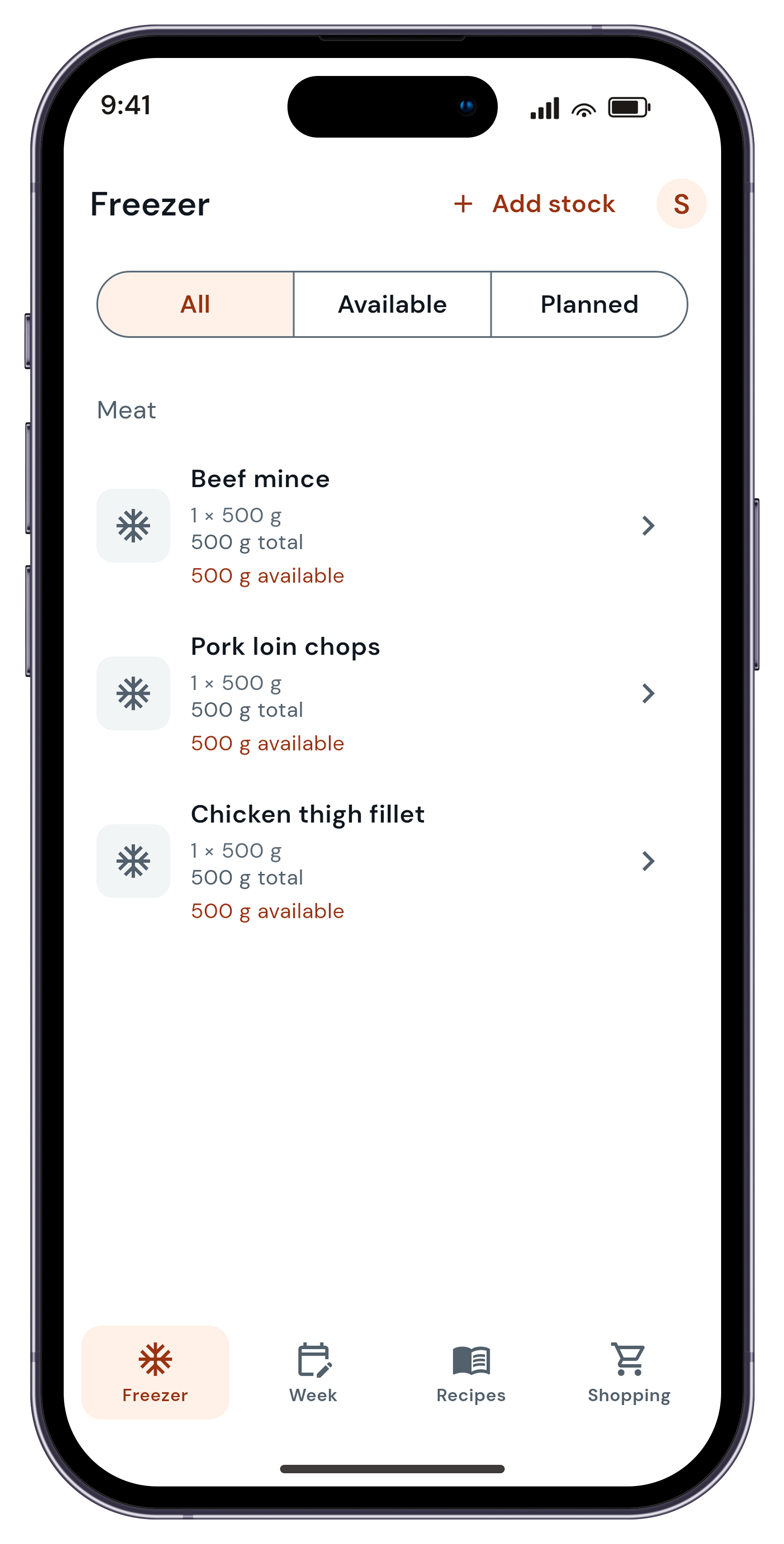
Sample freezer list with available meat packs.
01Your freezer

See what you have.

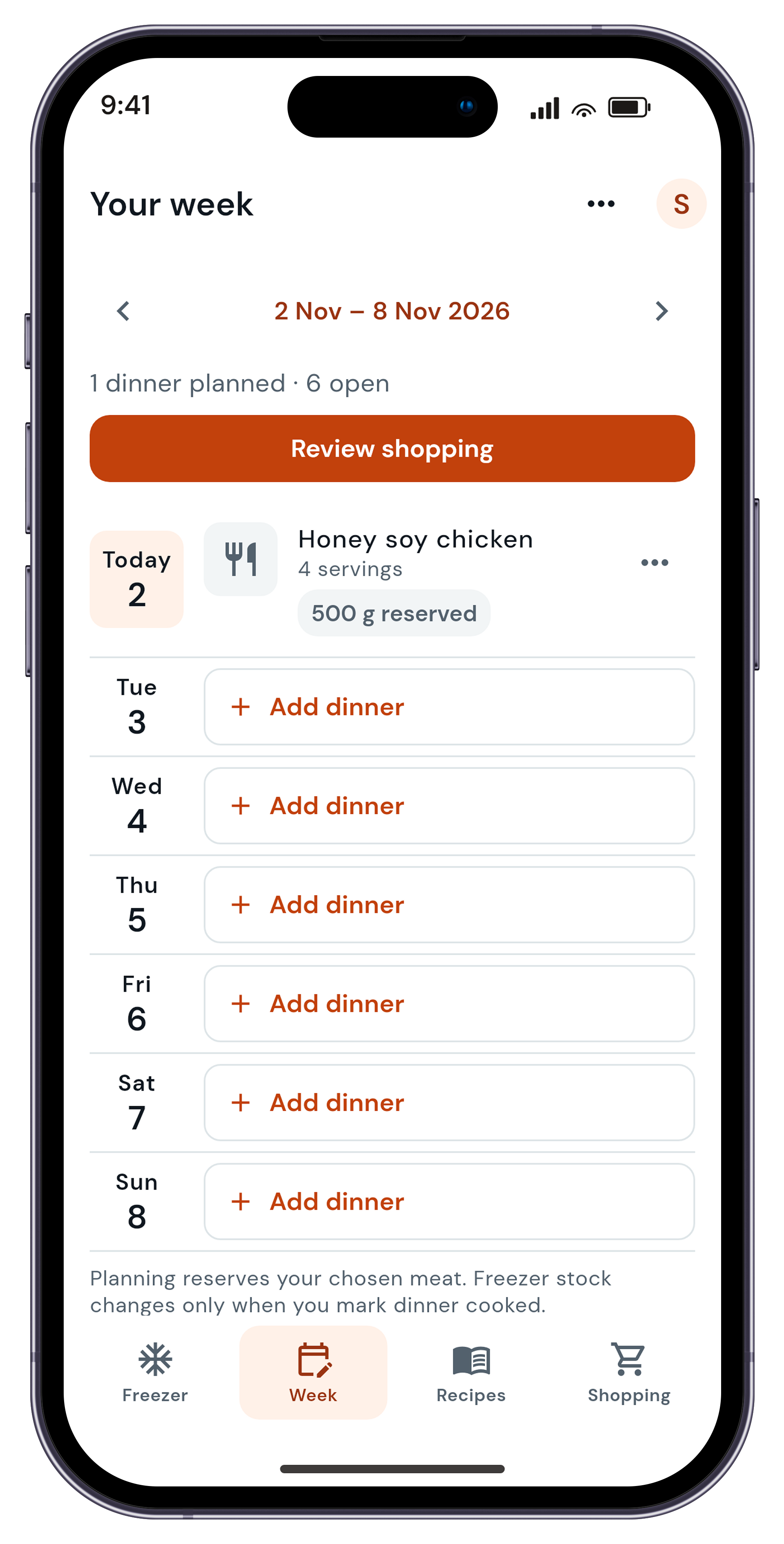
Sample saved week with Honey soy chicken planned for four.
02Your week

Give dinner a night.

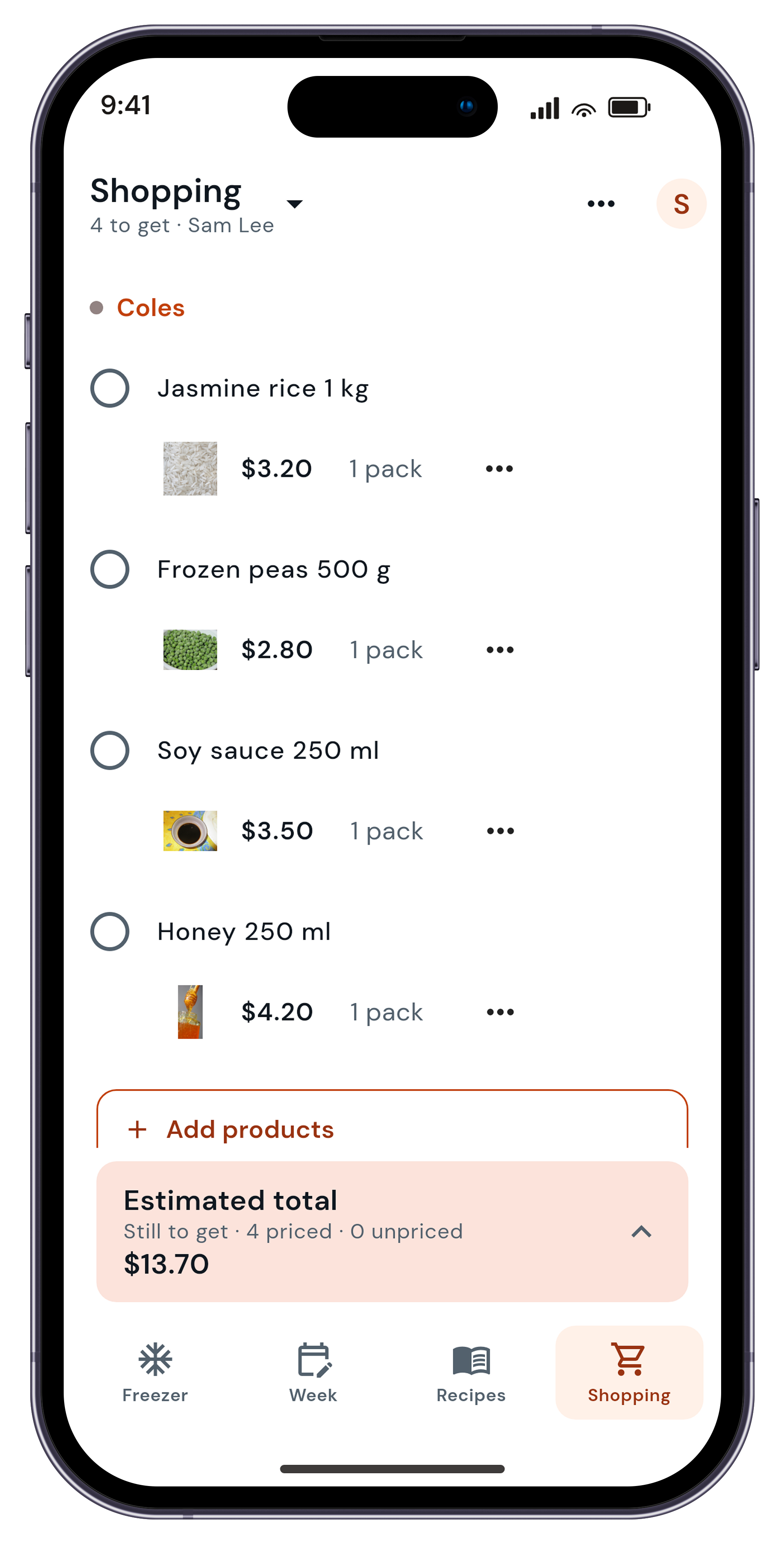
Sample shopping list with four priced items, no unpriced items, and an illustrative AUD 13.70 total.
03Your shopping

Bring the extras together.

Sample saved week with Honey soy chicken planned for four.

A plan that fits

Dinner, one night
at a time.

Pick a recipe, set your servings and choose a night.
Your week can take shape as you go.
Pick a recipe, set your servings and
choose a night. Your week can take
shape as you go.

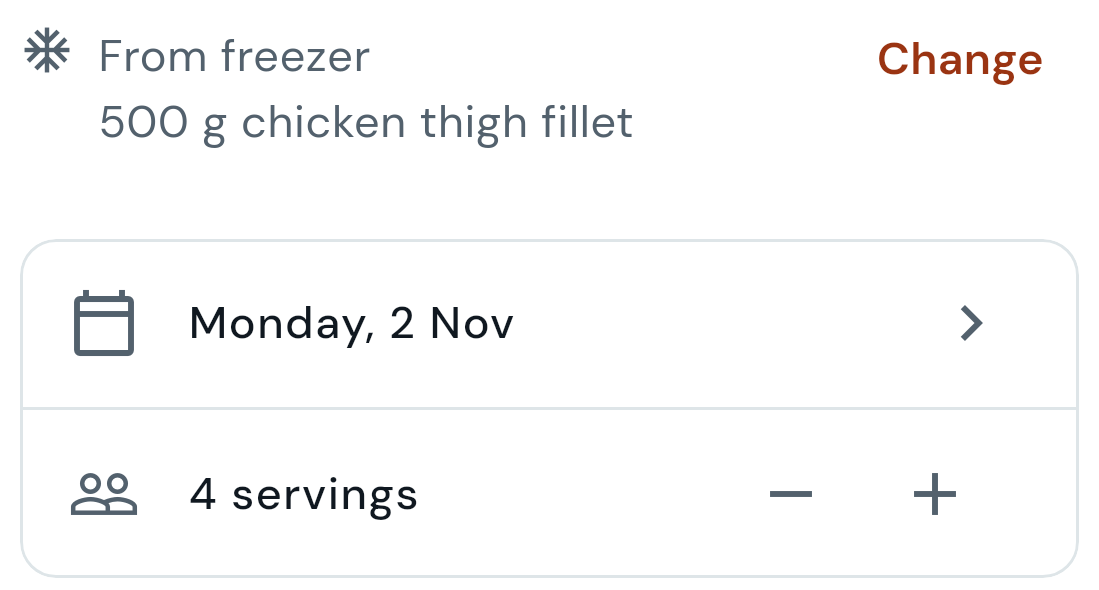
Dinner settings showing 500 g chicken thigh fillet from the freezer, Monday 2 Nov, and four servings.

From freezer to dinner

A little planning. A clearer week.

  1. 01

    Start with your freezer

    Add the packs and amounts you have. See what is available and what you have already planned to use.

  2. 02

    Give dinner a night

    Pick a recipe, choose your servings and set a night. Use a freezer pack where it fits, and leave other nights open until you know your plans.

  3. 03

    Shop for the extras

    Review the ingredients you still need and bring them into your shopping list. Check what is in the pantry and tick off the rest as you shop.

Planning reserves your chosen freezer amount. Mark a dinner as cooked to update the freezer amount it used.

Made for everyday dinners

Less to keep in your head.

See what is in the freezer

Keep track of your packs and amounts, so the chicken at the back can become a dinner this week.

Leave room for real life

Plan a few nights or a whole week. Change a dinner, its servings or its night before you cook. See calorie estimates where recipe information is available.

Bring the extras together

Review what your dinners need, add it to your shopping list and tick things off as you shop.

Share the list at home

Invite someone with a verified account to edit your shopping list and view your saved dinners.

An illustrative dinner

Chicken in the freezer. Dinner on Monday.

Take the Honey soy chicken shown in the app screens. Choose 500 g of chicken thigh fillet from the freezer, set four servings and give it a night.

Then review the extras. If you already have rice or soy sauce, check your pantry before you shop.

Illustrative example. Your dinners and shopping list will depend on what you choose.

Try ticking off the extras

Try the example list. It won’t change your saved shopping.

0 of 4 extras checked

Take your plan with you

Get Stirwise on your phone.

iPhone

Join through TestFlight and install the free TestFlight app. The invitation has compatibility details.

Join on TestFlight

Android closed test

Got an Android phone in Australia? The closed test needs 12 testers to use Stirwise for 14 days.

  1. Sign in to Google on your Android phone.
  2. Join the tester group, then become a tester.
  3. Install Stirwise and keep it installed for 14 days.
Join the tester group Become a testerAndroid closed test

Before you start

A few useful answers.

Help & contact
Do I need to add everything in my freezer first?

Start with a few packs you want to use. Add more as you go. You can plan dinners without completing a full freezer inventory.

Can I change a dinner before I cook it?

Yes. Change the recipe, servings or night before you mark it as cooked. Planning reserves your chosen freezer amount. Mark a dinner as cooked to update the freezer amount it used.

What can someone in my household see and change?

An accepted household invitation lets someone with a verified account edit your shared shopping list and view your saved dinners. Your freezer, dinner planning and account settings stay under your control.

Does Stirwise order or deliver groceries?

No. Stirwise helps you plan dinners and organise a shopping list. You choose where to shop and buy your groceries yourself. Stirwise is independent of supermarkets and does not place grocery orders.

Which phones can I use? Do I need internet?

Stirwise is made for iPhone and Android. iPhone access is through TestFlight, and Android is in closed testing. Check the invitations for compatibility. You need an internet connection to sign in, save changes and keep shared information up to date.

Is Stirwise free?

The base service is free. Optional Stirwise Pro purchases are available on iOS. Apple shows the current price and purchase terms in the app before you buy.

Prefer to start on paper?

A place for your freezer list and week.

Download the free two-page A4 freezer inventory and weekly dinner planner. Print it and fill it in at home.

Download the PDF

Start with what you have

Give your next dinner a plan.

Add a few freezer packs. Choose a dinner. Bring the extras with you.

Get the app

Access Stirwise

iPhone

Join on TestFlight

Install the free TestFlight app. The TestFlight invitation has compatibility details.

Join the Android closed test

Got an Android phone in Australia? The Android closed test needs 12 testers to use Stirwise for 14 days.

  1. Sign in to Google on your Android phone first.
  2. Tap Join the tester group, then Become a tester.
  3. Install Stirwise and keep it installed for 14 days.

App and account

Photo credits and disclosure

Stirwise — Current product direction — Photo credits Companion to the desktop visual direction. Please retain this file or link to equivalent attribution whenever sharing the image. Screens show sample data, illustrative prices and ingredient photos. Actual products, prices and availability vary. Image credits for the shopping screenshot These photographs illustrate ingredients, not the exact retail products, pack sizes or retailer stock. Prices remain synthetic illustrative data. Retain the credits and license links when using this screenshot, for example in a linked image-credits section. The photographs retain their stated licenses, including attribution and share-alike terms for adaptations. No claim is made to relicense the app source or its UI. Thai jasmine rice uncooked — Takeaway https://commons.wikimedia.org/wiki/File:Thai_jasmine_rice_uncooked.jpg CC BY-SA 3.0 — https://creativecommons.org/licenses/by-sa/3.0/ Original photograph bytes preserved. Displayed proportionally by the actual Flutter Image.asset widget with BoxFit.contain. No pixel edits, crops, painted overlays or generated packaging. Frozen peas — Jina Lee https://commons.wikimedia.org/wiki/File:Frozen_peas.JPG CC BY-SA 3.0 — https://creativecommons.org/licenses/by-sa/3.0/ Original photograph bytes preserved. Displayed proportionally by the actual Flutter Image.asset widget with BoxFit.contain. No pixel edits, crops, painted overlays or generated packaging. Bowl of soy sauce — Bodhi Peace https://commons.wikimedia.org/wiki/File:Bowl_of_soy_sauce.jpg CC BY-SA 4.0 — https://creativecommons.org/licenses/by-sa/4.0/ Original photograph bytes preserved. Displayed proportionally by the actual Flutter Image.asset widget with BoxFit.contain. No pixel edits, crops, painted overlays or generated packaging. Jar and honey stick — Tasmanianbeekeepers https://commons.wikimedia.org/wiki/File:Jar_and_honey_stick.jpg CC BY-SA 4.0 — https://creativecommons.org/licenses/by-sa/4.0/ Original photograph bytes preserved. Displayed proportionally by the actual Flutter Image.asset widget with BoxFit.contain. No pixel edits, crops, painted overlays or generated packaging. Landing-page treatment: the actual captured UI was uniformly scaled into the licensed device mockup. The photograph thumbnails were proportionally resampled, without additional content edits. Any contributions to these photograph reproductions are offered under each photograph’s stated CC BY-SA license. The app/UI and third-party device mockup are separate works, not offered under these photo licenses. No photographer or Wikimedia endorsement is implied.

Full photo credits